
Password migration & security
Use explicit password modes and the protected Joomla password-hash workflow safely.
Choose an explicit password mode
User Import & Export never guesses whether a source column contains plain passwords or existing Joomla password hashes. The mapping and the selected mode must agree.
| Mode | Behaviour |
|---|---|
| No password from the file | New users receive a securely generated password. Existing passwords remain unchanged. |
| Plain password from the mapped column | Joomla validates and hashes the plain value. Existing passwords change only when explicitly allowed. |
| Existing Joomla password hash | A supported Joomla 5.4/6.x hash is preserved without double hashing. |
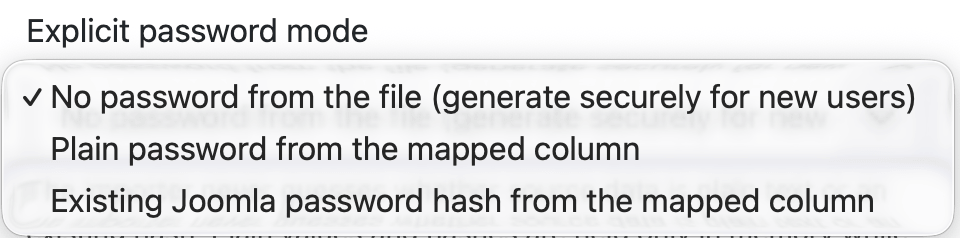
Plain-password import
Use plain-password import only when the source system can provide passwords through an approved secure process. Joomla's configured password requirements are applied. Empty cells never replace an existing password.
For new users, you can require a password change at the next login and send Joomla's welcome mail. Remember that e-mail itself may expose a generated or supplied password depending on your Joomla mail configuration.
Joomla password-hash import
Hash import is designed for controlled Joomla-to-Joomla migration, where users should retain their existing login. Unsupported or malformed hash formats are rejected during validation.
- Map the source column to Existing Joomla password hash.
- Select the matching explicit hash mode.
- Confirm that hash import is allowed in component options.
- Test representative migrated accounts on the target site.
Password-hash export
Hash export is deliberately protected by several independent controls:
- Allow password hash export must be enabled in component options. It is disabled by default.
- The current account must be a Joomla Super User.
- The account must have the dedicated Export password hashes permission.
- The sensitive field must be selected deliberately.
- The warning checkbox and confirmation phrase must be completed.
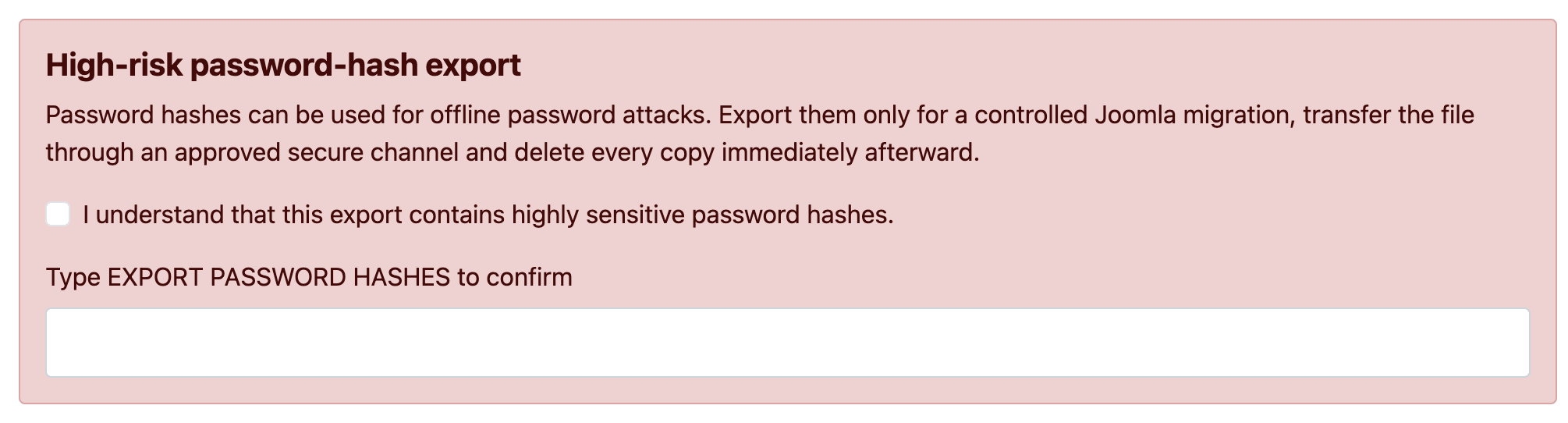
Password hashes can be used for offline password attacks. Export them only for a controlled migration, use an approved encrypted transfer channel and delete every copy immediately after verification.
Short-lived, single-download files
A password-hash export expires after the configured short retention period—15 minutes by default—and is deleted immediately after its first successful download. It is never included in a saved export profile.
Data that is never retained
Plain passwords and password hashes are not stored in job rows, mapping profiles, export profiles, logs or CSV result/error reports. Sensitive values are held only as needed while a row is processed.
